





21 Oct Data Backup and Recovery Services in Doral: What They Include
A backup only supports business continuity if the data can be restored when it’s needed. For local businesses, data backup and recovery services in Doral protect critical information with separate copies and restore data that’s lost, deleted, corrupted, or inaccessible. The 3-2-1 guideline recommends keeping three copies of data on two types of storage, with one copy off-site.
It’s natural to assume that having a backup means a business is ready to recover. But recovery also depends on whether the copies are usable and how much data and operating time the business can afford to lose. This article explains what backup and recovery involve, how to evaluate recovery readiness, and how protected backups can help operations continue after a ransomware attack.
When assessing data backup and recovery services in Doral, consider why recovery software or cloud storage alone may not address every risk. Recovery testing shows whether a backup plan works in practice and clarifies what needs protection and what it takes to restore essential systems and information.
Key Takeaways
- Backups create separate copies of important business data; recovery puts usable information and systems back into operation after loss or disruption.
- Recovery Point Objectives and Recovery Time Objectives help define how much data loss and downtime a business can tolerate.
- Evaluate recovery readiness by testing whether backups can be restored and whether the restored data supports essential operations.
- Recovery software and cloud storage each have limits, so backup design should account for threats that could affect both primary systems and stored copies.
- Protected, tested backups can support business continuity during ransomware incidents, while managed IT services can help align recovery planning with security and day-to-day support.
Business continuity during ransomware attacks
Ransomware recovery supports business continuity by restoring usable data and essential services after systems become inaccessible. A backup plan should also account for communication tools, including business phone systems.
For a visual overview of the difference between backup and disaster recovery, watch this video from IBM Technology:
Ransomware Recovery and Business Continuity
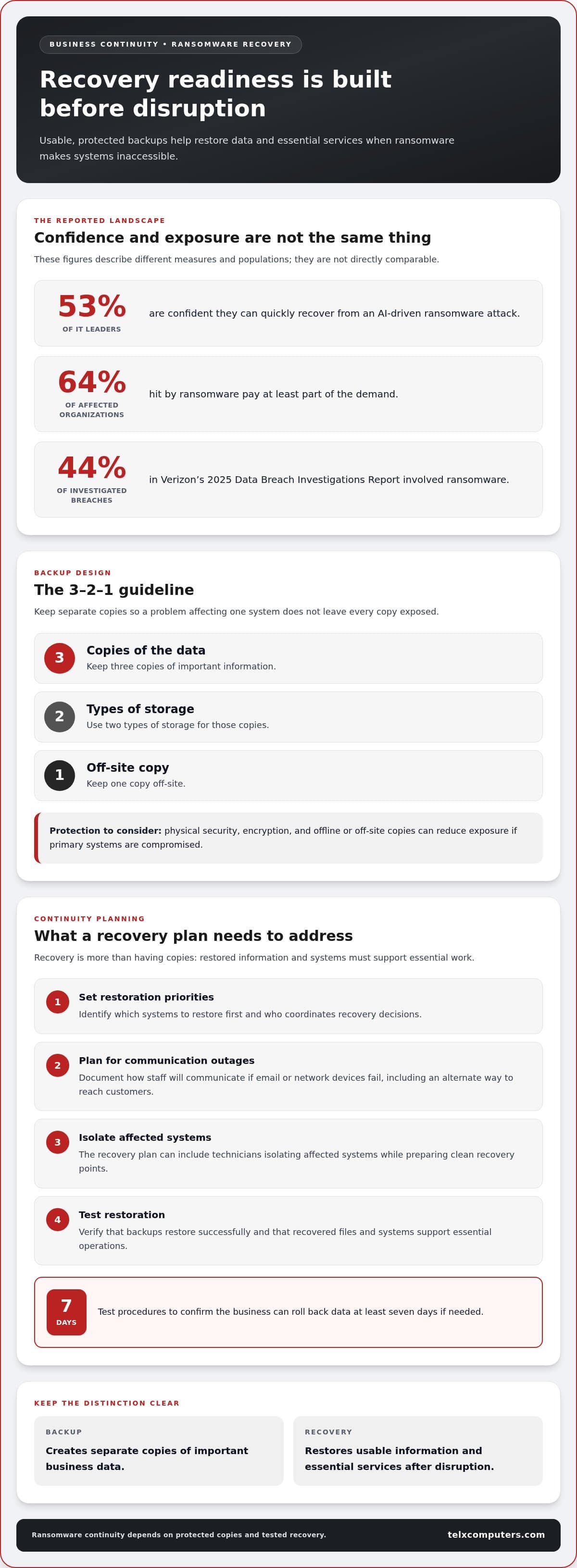
Ransomware recovery means restoring data and services after malicious software disrupts access, so employees can resume essential work. A business continuity plan identifies which systems to restore first, who coordinates decisions, and how staff communicate if email or network devices fail. For example, a company can document an alternate way to reach customers while technicians isolate affected systems and prepare clean recovery points.
Business Data Backup Planning
Backup planning sets out which data is copied, where copies are kept, and how restoration supports business operations. Cloud backups store copies remotely; onsite backups allow access at the business location; hybrid plans combine both. The 3-2-1 guideline recommends three copies on two types of storage, with one copy off-site. For a Doral company, the choice depends on access needs, system configuration, and exposure to local equipment failure.
Choosing a Doral Backup Provider
A suitable provider should connect backup design to recovery priorities, test restoration, and explain how the plan covers servers, hard drives, and ransomware incidents. Ask how the process handles isolated devices, verifies recovered files, and restores business phone access if the phone system depends on affected infrastructure. Doral businesses can also consider how IT outsourcing services coordinate recovery with ongoing technology operations.
Backup Risks and Recovery Requirements
Backup risk management protects stored copies and sets retention rules so recovery points remain available when ransomware encrypts primary files. Encryption helps protect data in storage or transit, while offline or off-site copies reduce exposure to compromised systems. Recovery from a damaged hard drive, server failure, or ransomware depends on the condition of the source and whether a usable copy exists. The National Institute of Standards and Technology cites Special Publication 800-88 Rev. 1, Guidelines for Media Sanitization. A backup plan is operational, not a statement of Florida law: it preserves data and incident records but doesn’t itself determine whether notification is required.
Recovery readiness deserves attention before an incident because confidence is not universal. Only 53% of IT leaders are confident they can quickly recover from an AI-driven ransomware attack. Meanwhile, 64% of organizations hit by ransomware pay at least part of the demand. Ransomware figured into 44% of the breaches investigated in Verizon’s 2025 Data Breach Investigations Report.
Businesses should protect backups with physical security, encryption, and offline copies. They should test recovery procedures to ensure they can roll back data at least seven days if needed. These steps keep planning focused on whether usable copies and rollback procedures are available when primary systems are disrupted. This approach helps organizations assess continuity readiness without treating ransom payment as a substitute for recovery capability.
What is backup and recovery?
Backup creates recoverable copies of business information; recovery restores data and systems after loss or disruption. Recovery Point Objectives and Recovery Time Objectives turn these processes into measurable business priorities. For businesses comparing data backup and recovery services in Doral, these objectives connect technical plans to day-to-day needs.
Recovery Point and Recovery Time Objectives
A Recovery Point Objective (RPO) defines how much recent data a business can tolerate losing, while a Recovery Time Objective (RTO) sets the target for restoring access. These objectives help teams decide which applications need the fastest recovery and most frequent protection. For example, losing recent transactions may affect a payment system more than an older archive.
Reducing an RPO means capturing changes more frequently, or continuously, so a restore can use a newer copy. Reducing an RTO requires preparation, such as documenting system dependencies, assigning recovery roles, and rehearsing restoration. Faster targets can require more storage, network capacity, and coordination, so set priorities according to the operational impact of downtime and missing data.
Emergency support response time is the interval before help begins, not the time needed to restore systems. For a Doral business, the response process should define how incidents are reported, escalated, and coordinated. Actual recovery time depends on the affected systems, data condition, and complexity of restoration.
Backup Frequency and Recovery Points
Backup frequency determines how closely available recovery points match the RPO. A daily copy may leave more recent changes unprotected than a more frequent schedule. Critical databases and email servers typically require backups every 15 to 60 minutes, or continuous data protection when near-zero data loss is required. The suitable interval depends on how quickly information changes and how much loss operations can absorb.
Consider a business database updated throughout the workday. If copies are created too far apart, restoring the latest one may leave later orders or edits missing. A tighter schedule creates newer recovery points, but teams also need to confirm that copies contain consistent, usable data rather than incomplete changes.
Recovery testing connects targets to real outcomes. A test can track the time needed to restore a selected application and compare the result with its RTO. Teams can also compare the restored data’s timestamp with the RPO, review missing records, and adjust backup frequency or system priorities. This turns objectives into practical planning tools rather than figures on a page.
For Doral businesses, align RPO and RTO targets with specific workflows, such as order processing, payroll, or customer email. When evaluating data backup and recovery services in Doral, document who makes recovery decisions and which systems return first. This clarity helps technical teams focus on the areas where disruption would most affect daily operations.
Backup and recovery definitions
A backup is a separate copy of business data kept for retrieval after loss. It may capture documents, databases, email, or configuration files. For example, a copy of an accounting folder can preserve invoices if a user accidentally deletes the originals. Backup systems can also save and store information automatically, reducing reliance on someone remembering to copy files manually.
Recovery is the process of returning lost, deleted, corrupted, or inaccessible data to a usable state. It may involve restoring one document, a database record, or an entire system. If an employee overwrites a spreadsheet, recovering the file may be enough. If a server fails and several applications become unavailable, recovery may also require restoring data and the system components those applications depend on.
These terms describe connected but distinct functions: the saved copy is the source, while restoration makes the information available again. A copy alone doesn’t show whether files open or an application can use them. A practical recovery check restores a sample file, opens it, and compares its contents with the expected version. This can reveal damaged or incomplete copies before an urgent incident.
Some databases support point-in-time recovery, which can restore data to an exact time, such as 1:37pm. This can help when an accidental change or corruption affects records after that point. The chosen time matters: restoring too far back may omit valid updates, while restoring too late may retain damaged information. For example, a team recovering a customer database should identify when the problem began and select a clean recovery point.
Recovery can also mean rebuilding access, not simply copying files back. A restored database may depend on its application, configuration, and user permissions to function as expected. For example, a business might restore customer records but be unable to open them because the supporting application settings are missing. A sound recovery process checks the data in its operating context, confirms authorized staff can use it, and records the test result.
Encryption adds another consideration: it transforms data into a protected form that requires the right key for access. A backup can be stored securely yet remain unusable if its decryption key is unavailable during recovery. Planning should therefore account for both the data copy and the means to restore readable information. Clear documentation helps teams distinguish a stored backup from a completed, usable recovery.
Data backup means keeping a duplicate copy of information so it can be retrieved after data loss. That duplicate serves as the source for recovery.
Data recovery evaluation and process
Recovery evaluation identifies what data was affected, which copies remain usable, and which operations need restoration first. A documented sequence helps teams make evidence-based decisions rather than rely on assumptions.
Evaluating Data Recovery
Evaluation assesses affected systems, available recovery points, and data integrity before restoration begins. It matters because choosing the wrong copy can restore corrupted information or omit valid work. First, identify the affected files, database, or device, then establish when the issue began. That timeline helps pinpoint a clean recovery point.
Next, inspect the cause of data loss and the condition of each available copy. After a server failure, confirm which databases and applications depend on that server. After accidental deletion, identify the specific folder or records rather than restoring an entire environment. Record what remains accessible, what is damaged, and which business tasks depend on recovery.
Then compare candidate copies with known-good information. Open restored documents and check database records against recent transactions, for example. Review permissions and configuration, too, because readable files may still be unavailable to the employees who need them. This evaluation defines the recovery scope and helps prioritize systems with the greatest operational impact.
Verifying Backups and Testing Recovery
Backup verification checks that stored copies are intact; recovery testing confirms teams can restore and use them. Both matter because a successful backup log alone doesn’t prove business data protection will work during an incident. Test a representative file or system in a controlled environment, then record the result.
A useful disaster recovery exercise follows the written plan from detection through restoration. Assign roles, select a recovery point, restore a sample workload, and confirm users can access the required data. Compare the result with the organization’s recovery objectives and note delays, missing permissions, or dependencies. Update the plan if a step fails or staff responsibilities change.
Testing should also check whether data can be rolled back at least seven days if needed. Schedule recovery tests to verify backup integrity and refine Recovery Point Objectives and Recovery Time Objectives. A test record should capture the date, systems examined, selected copy, restoration result, and follow-up actions. If an application opens but displays incomplete records, for example, investigate the backup scope before relying on that copy.
Finally, review findings with the people responsible for business operations. The finance team can confirm restored invoices, while customer service checks contact records. These practical checks connect the technical recovery strategy to real work and reveal whether restored information is usable, complete, and available to the right users.
Limits of recovery software and cloud backups
Recovery software can help retrieve files after accidental deletion, but it can’t address every kind of data loss. Tools that scan a working drive may find deleted files, but they can’t make a failed device or unavailable encryption key usable. After deletion, stop writing new data to the device, since new files may overwrite information the software could otherwise recover.
Software also depends on the type and extent of damage. A corrupted file system differs from a physically damaged drive, and each requires a different response. If a server fails, a file recovery tool alone won’t rebuild its configuration or restore every application dependency. Identify the failure first, then decide whether restoring a backup or recovering specific files better fits the situation.
Cloud backups provide off-site protection, but they don’t eliminate every dependency. An internet outage can block access to remote copies, and compromised credentials can put stored data at risk. Establish how essential files will remain accessible if the network is unavailable. Protect backup accounts, too, and test access using the process staff would follow during a disaster.
Cloud synchronization and backup serve different purposes. Synchronization may copy a deletion or unwanted change across connected devices, while a backup with retained recovery points can provide an earlier version. If ransomware encrypts a shared folder and that change synchronizes, for example, an older protected copy may offer a cleaner restore point. Retention settings determine whether the earlier version remains available.
Ransomware can also target backups connected to compromised systems. Offline copies and immutable storage can reduce exposure because they’re harder to change or erase through ordinary access. Object First’s 2026 survey found that 79% of IT leaders identified attacker access to backups as their primary concern. That concern makes separation, access controls, and restoration tests practical parts of a recovery strategy.
Cloud storage alone doesn’t prove a business can recover. A copy may be incomplete, outdated, or dependent on credentials and applications unavailable during an incident. Test a sample restoration, confirm the files open, and verify employees can access them. Include a scenario with interrupted internet access so the recovery plan accounts for files needed during the disruption.
The takeaway is to treat recovery software as one tool, not a complete protection plan. Pair it with independent copies, controlled access, useful retention, and tested recovery procedures. Businesses reviewing how ransomware protection fits into that plan can explore ransomware protection as part of their broader data protection strategy.
Telx Computers: Managed IT Services
Telx Computers helps businesses coordinate technology support through Managed IT Services, with Network Security and Cloud Computing supporting a broader operational strategy. Turn to this approach when backup planning needs to work alongside system access, security controls, and everyday IT operations. For example, recovery planning is more useful when teams also understand which systems are critical and how employees will regain access after disruption.
Telx Computers’ 24/7 Help Desk Support gives businesses a point of contact for IT support needs, while managed services can bring ongoing technology priorities into one coordinated plan. To discuss how managed IT support can fit your business, contact Telx Computers.
Make recovery readiness part of your next business decision
A recovery plan is more useful when it reflects how your business operates. Identify which work must continue during a disruption, who can make restoration decisions, and how staff will access essential systems. Revisit these priorities whenever your operations or technology change. This keeps the plan tied to real business needs instead of letting it become outdated.
If you’re evaluating data backup and recovery services in Doral, consider how recovery planning fits with the support that protects daily operations. Telx Computers offers Managed IT Services, Network Security, and 24/7 Help Desk Support to help businesses coordinate IT needs. The next step can be a conversation about your priorities and how they align with your existing environment.
Contact Telx Computers to discuss your business’s IT support needs and take a practical step toward stronger operational readiness.
Frequently Asked Questions
How often should data backups occur?
Set backup frequency according to how quickly information changes and how much work the business could recreate after a loss. A sales team entering orders throughout the day may need more frequent protection than a department storing reference documents that rarely change. Review schedules when workflows, applications, or data volumes shift, so backup timing continues to match operational priorities.
What types of data sources typically need to be recovered?
Recovery may involve files, databases, email, servers, workstations, cloud accounts, or business phone system configurations. The right scope depends on the disruption: accidental deletion may affect one shared folder, while a server failure can affect several connected applications. Include the data and settings employees need to resume work, such as customer records, current documents, application configuration, and access permissions.
What do backup and disaster recovery services include for RPO, RTO, testing, and monitoring?
These services can align recovery targets with business priorities, monitor backup activity for failures, and test whether selected systems can be restored. RPO sets an acceptable limit for lost changes, while RTO sets a restoration time target. Monitoring can flag missed or failed backup jobs for investigation. Testing can also reveal dependencies, such as an application requiring a particular database or configuration before staff can use it.