





30 Oct How to budget for predictable monthly IT costs in Miami
A fixed monthly IT fee does not automatically cover new laptops or servers. For predictable monthly IT costs for SMBs in Miami, budget for hardware separately unless the service agreement explicitly includes equipment purchases or replacements. This prevents a steady support bill from being mistaken for an all-in technology budget.
A fixed plan can make IT spending easier to forecast, but support and equipment are different costs. A plan may cover ongoing services while hardware remains a separate purchase, so review the scope as carefully as the billing model.
This guide explains how to compare hourly support with fixed fees, account for Miami-area planning needs, and budget for laptops, servers, and other hardware separately. It also covers how per-user and per-device pricing can change as your team grows, helping you build a practical monthly budget and plan for larger purchases.
Key Takeaways
- Compare hourly support with fixed monthly fees by weighing bill predictability against how often your business needs help.
- Build a Miami-area budget that accounts for seasonal emergency support and hurricane preparation, not just routine IT work.
- Separate hardware purchases from support fees unless your plan clearly includes equipment, and budget for replacements in advance.
- Choose per-user or per-device pricing based on how your team and technology are likely to change as the business grows.
Hourly billing compared with fixed monthly fees
For predictable monthly IT costs for SMBs in Miami, list covered support and exclusions. Compare contract terms, response targets, escalation steps, renewal conditions, and price-change triggers before signing.
Compare South Florida Provider Quotes
Compare each South Florida MSP quote against the same written inventory and support scope. Include users, devices, locations, support hours, on-site visits, and security or backup tasks. Separate recurring support from project work, hardware, and other exclusions. For example, remote troubleshooting alone is not equivalent to a package that also includes on-site work. Ask each provider to identify what triggers additional charges so you can compare the service your business needs.
Review Contract Terms and Service Levels
Read the service agreement alongside its service-level terms, not just the proposal summary. Check the contract term, renewal process, cancellation notice, and how either party can end the agreement. Review response targets by incident priority, support hours, escalation steps, and whether each target covers acknowledgement or resolution. For a Miami office, define how to report a critical outage and who coordinates follow-up. Clear responsibilities help prevent disputes when an urgent issue falls outside routine support.
Check Price Increases and Surprise Charges
Find the exact contract language on renewals and increases. Check whether changes follow a stated schedule, require advance notice, or depend on added users, devices, or services. Identify charges for emergency work, on-site visits, projects, after-hours support, and work outside the agreed scope. Require written approval before out-of-scope work begins, and make sure each invoice charge maps to a contract term. This helps prevent unexpected work from becoming an unexplained bill.
Your case-specific price depends on the support scope, user and device inventory, coverage, and included services. A quote should state the exact figure and identify what the agreement covers.
Miami and South Florida cost factors
Build your estimate around local disruption risks and the services your business uses. In South Florida, seasonal demand and hurricane preparation can affect planning.
Identify Factors Affecting Monthly Rates
Start with your user count, device inventory, office locations, and required support coverage. Then map each factor to the work it creates, such as remote troubleshooting, onsite visits, or managing several locations. South Florida emergency IT rates can rise by 30% or more during peak seasons. Treat that as a planning risk, not a routine monthly charge.
Miami businesses should also plan for hurricane preparation between June and November. List the work your business may need before severe weather, including protecting data access and preparing systems for disruption. Have these tasks described separately from routine support so seasonal preparation is clear in the estimate.
Account for Additional Service Costs
Ask whether cloud services, Microsoft 365, cybersecurity, backups, and help desk support are bundled or billed separately. Each can affect the monthly total through user licenses, storage, data retention, security coverage, or support scope. For example, adding employees may increase license needs, while keeping more backup data can change storage requirements.
Compare the included service level, not just the category name. “Backup” may describe a service, but your budget also depends on which data is covered, how long it is retained, and who handles recovery. Use the same service list when reviewing each estimate.
Build a Seasonal and Usage-Based Plan
Separate predictable recurring needs from seasonal preparation and changes in usage. Create a monthly baseline for ongoing support, software, cloud resources, security, and backups. Record likely changes, such as staff growth, new devices, or additional storage, as separate budget assumptions. This makes it easier to explain an updated estimate when business needs change.
For example, a Miami office preparing for hurricane season can budget that work separately from routine help desk support. Review the assumptions when staffing, systems, or coverage needs change. A clearly defined managed IT support plan can help organize those recurring needs and identify what falls outside the monthly scope.
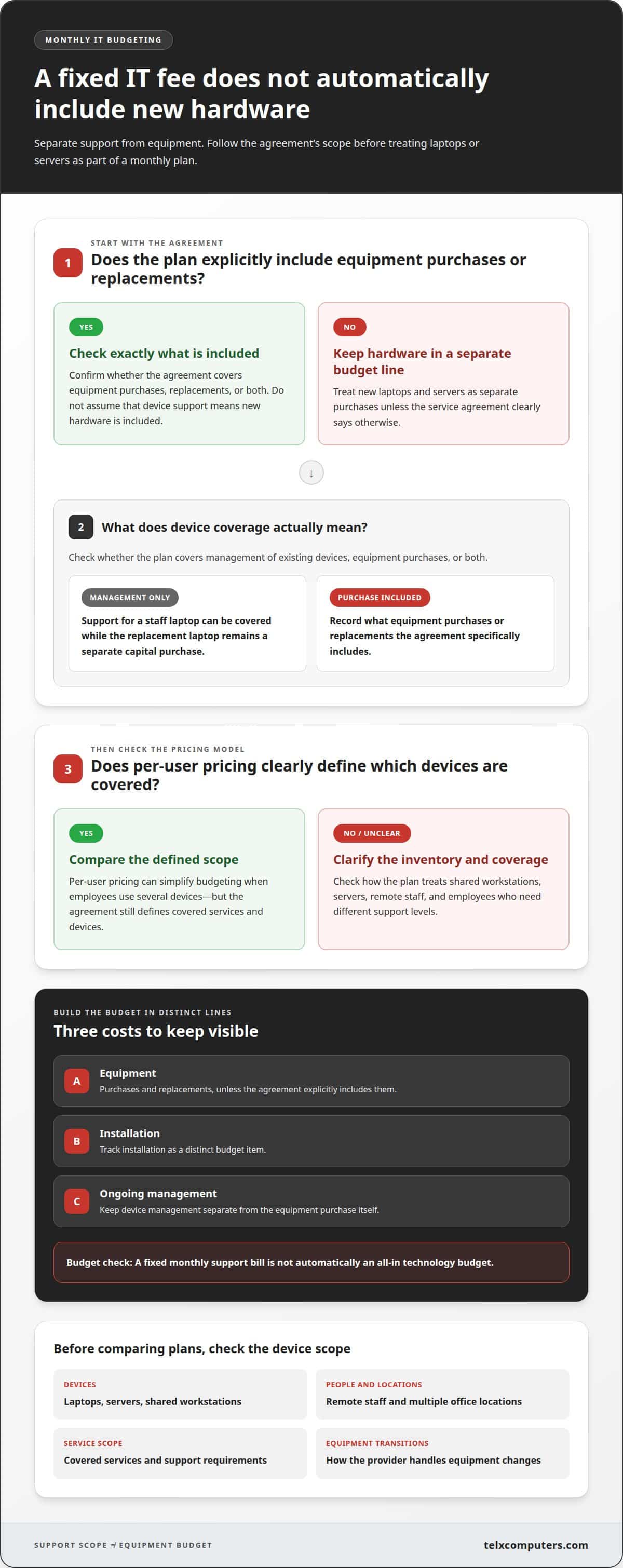
Does predictable pricing include new hardware like laptops and servers?
Recurring support and new equipment usually belong in separate budget lines. Review the agreement’s hardware scope before comparing per-user plans.
- Separate equipment purchases from support coverage. Check whether the plan covers management of existing laptops and servers, equipment purchases, or both. Support may include routine help with devices without covering replacement hardware. For example, a monthly service line can cover assistance with a staff laptop while the new laptop remains a separate capital purchase. Record equipment, installation, and ongoing management as distinct budget items.
- Compare the scope of per-user plans, not just the billing unit. Per-user pricing can simplify budgeting when employees use several devices, but the agreement still defines which services and devices are covered. Check how it treats shared workstations, servers, remote staff, and employees who need different levels of support. For a Miami business, compare local providers using the same inventory and support requirements. Review how each handles on-site work, escalation, equipment transitions, and recurring services.
- Plan a managed-service transition as a defined project. Moving from hourly support to a monthly plan can take about 14 days. Use that window to assemble a device inventory, account list, network documentation, and backup responsibilities. Agree on who manages open issues and how staff report problems during the handoff. A clear transition plan reduces the risk of missed requests or unclear ownership while support responsibilities change.
- Set a hardware replacement process before a device fails. List business-critical laptops and servers, note their roles, and decide how replacement purchases are approved. Keep those purchases separate from recurring services in your budget, even when the same provider manages the equipment. This helps your team forecast support needs without treating a new server as a predictable monthly service charge.
Per-user or per-device pricing and scalability
Choose the billing unit that best matches how your Miami team uses technology. Then consider how the model handles growth, shared equipment, and staffing changes.
Compare Per-User and Per-Device Pricing
List employees and assigned equipment before comparing the two models. Per-user pricing counts people, which can suit staff who use a laptop, phone, and tablet. Per-device pricing counts managed equipment, which can better reflect a business with shared workstations or dedicated servers. Check how the agreement treats contractors, part-time staff, conference-room computers, and devices used by several employees. The billing unit alone does not define what support includes.
Assess Pricing Scalability
Test each model against realistic changes in staffing and equipment. For example, if one employee receives a second device, per-device billing may change while per-user billing may not. If a team adds employees who share workstations, the reverse may be true. Find out how additions and removals are reported, when the recurring count updates, and how temporary changes are handled. Clear adjustment rules make forecasts easier to maintain.
- Build a simple comparison using your current inventory. Record each employee, assigned devices, shared systems, and equipment requiring distinct management. Apply each provider’s stated billing unit to the same list, then note exclusions and service differences separately. This prevents a low-looking total from hiding unmanaged devices or support gaps. Revisit the comparison when a department changes its work pattern or adds technology.
- Choose the structure that follows your business’s growth pattern, not just today’s headcount. A consulting team with mobile staff may prefer employee-based accounting, while a small office with shared stations may focus on equipment counts. For predictable monthly IT costs for SMBs in Miami, write down the billing trigger for each change. Discuss IT outsourcing options when you want a pricing structure aligned with your operating model.
Telx Computers: Managed IT Services
Telx Computers helps businesses plan ongoing technology support through Managed IT Services with fixed-price, unlimited service plans. This approach can make support spending easier to forecast while bringing day-to-day IT needs into a coordinated plan. It fits businesses seeking clearer budgeting alongside services such as 24/7 Help Desk Support, Network Security, and Cloud Computing.
Before comparing a plan with your budget, align its scope with your user count, devices, and required services. Keep hardware purchases separate unless the agreement explicitly includes them. This gives your team a clearer view of recurring support and a basis for planning equipment purchases.
If you’re ready to discuss a support plan around your business needs, request a quote from Telx Computers.
Make Your IT Budget a Planning Tool
A technology budget works best when it informs decisions, not just records expenses. Assign a clear owner to review IT commitments and connect upcoming technology needs with business plans. Hiring, new projects, and changing workflows can then prompt a deliberate budget update instead of an unexpected scramble.
Building predictable monthly IT costs for SMBs in Miami is an ongoing process. Keep budget assumptions alongside your technology roadmap, and revisit them as business priorities shift. Regular reviews help leadership see which commitments support current operations and which decisions need attention before the next planning cycle.
For a partner in shaping an IT plan around your business, contact Telx Computers to discuss IT pricing. Bring your priorities and growth plans to the conversation, then take the next step with a clearer view of how technology can support your team.
Frequently Asked Questions
Is a flat monthly fee really cheaper than paying by the hour?
Not always. The better fit depends on how much support your business uses and how steady that need is. A business with infrequent, straightforward requests may spend less with hourly billing. A team with recurring support needs may value the budget stability of a fixed fee. Compare recent support patterns with the services covered, then weigh expected spending against predictability.
What Exactly Are Predictable IT Support Costs?
Predictable IT support costs are recurring expenses planned around an agreed service scope and billing structure. They help a business forecast routine technology support instead of treating every request as a separate surprise. For example, a monthly operating budget can account for ongoing help desk coverage while tracking equipment purchases and one-time projects separately. The contract defines what belongs in each category.
What is the average monthly cost of managed IT services for a small business in Miami?
There is no single average that accurately fits every small business in Miami. The exact monthly price depends on the business and is provided after a quote request. Scope, employee and device counts, support coverage, cloud resources, security needs, and backup requirements all influence the estimate. Use your actual technology inventory and priorities to make the quoted figure relevant to your operation.
How do Miami MSPs price IT support per user, per device, or with flat-rate plans?
Per-user pricing counts the people receiving support, while per-device pricing counts managed equipment. Flat-rate plans charge a recurring amount for an agreed scope rather than tying each bill to individual support requests. To compare models, map your employees, assigned equipment, shared systems, and coverage needs. Then check how the agreement handles staffing changes and added devices.
What is typically included in a fixed monthly managed IT services fee?
Inclusions depend on the agreement. A managed plan may combine routine technology management with help desk support, maintenance, monitoring, security, cloud services, or backups. Count an item as included only when the contract says so. For example, a plan might cover server management without including a replacement server or major migration project. Separate recurring duties from one-time work in your budget.
What factors affect monthly IT costs for Miami businesses, such as company size, industry, and compliance needs?
Monthly costs can change with employee and device counts, locations, support coverage, and the complexity of business systems. Industry needs also matter: a firm handling sensitive records may require a different security and access approach from an office with simpler workflows. Compliance-related work can add planning and documentation requirements. In Miami, describe your operational needs clearly so the proposed scope reflects them.